 Français
 English
Order a domain name.
A domain name is registered from your client area, in your name, at a fixed price that does not rise at renewal. With the Pro and Agence plans paid yearly, a .fr, .com, .eu, .be, .net or .org domain is free.
1. Search for the name
In your client area, open Domain names, type the name you want in Find a name, then click Search. Availability is shown for each extension.
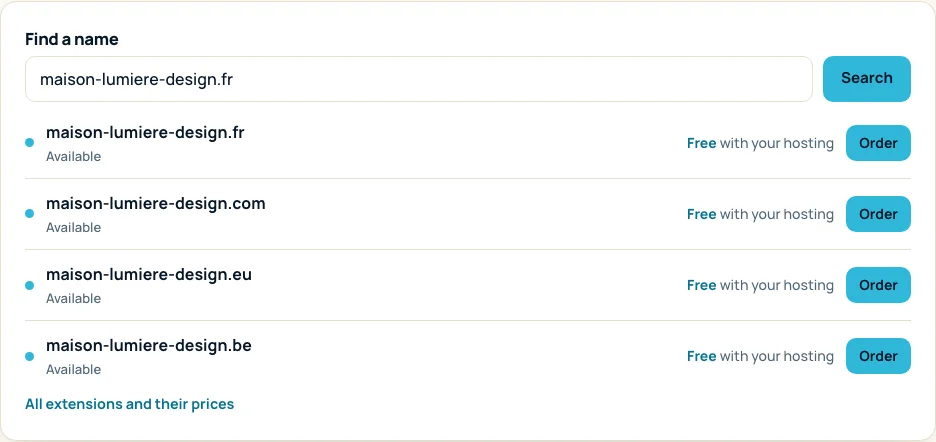
The All extensions and their prices link, below the results, gives the yearly price of each extension. It is the same at registration, transfer and renewal.
2. Order
Click Order on the name's row, then enter the domain holder: these are the details sent to the registry. If the domain is free for you, choose to link it to your hosting and click Confirm the order. Otherwise, choose the website that will use it as its address, if it still runs on its free address, then pay by card or PayPal.
The domain is registered within minutes. Linked to a website that still runs on its free address, it becomes that website's main address on its own, and the free address keeps working. Otherwise, click Add to my site on its page, or Add a domain on the site's screen.
Renewal
A free domain renews at no cost with your hosting, as long as the hosting is paid yearly. For other domains, the renewal invoice arrives by email one month before the expiry date, with the date and the amount. You pay it from the domain's page, with Pay the renewal. Without payment, the domain expires.
DNS zone and DNSSEC
A domain that points to our name servers has its zone on its page: add a record (A, AAAA, CNAME, MX, TXT, SRV or CAA) or remove one, and the change answers within a few minutes. For a domain linked to a hosting plan, the records of its website and email are managed by Web-Minute and can be changed in the DNS section of the advanced panel, for example to use an outside mail service. For a domain taken on its own, simply replace the MX record with your provider's.
A domain taken on its own can also send its visitors to another website. On its page, enter the address in Redirect to, for example https://www.yoursite.com: the domain and its www lead there over HTTPS within a few minutes. With Keep the requested page, yourdomain.com/contact leads to the /contact page of that address; without it, every page leads to the address you entered. Remove the redirect turns it off.
With no redirect and no address in its zone, the domain shows a “This domain has been registered with Web-Minute” page, hidden from search engines. It goes away as soon as you set a redirect, add your website’s address (A, AAAA or CNAME) for the domain or www, or connect the domain to a hosting plan.
On the same page, Turn on DNSSEC signs the answers of our name servers and publishes the key with the registry, within a few hours. The button shows when the domain points to our name servers.
Transfer a domain to us
Your domain is registered elsewhere? Search for it in Find a name: it shows as already registered, with the Transfer button. You need its transfer code, also called EPP code or AuthCode, which your current registrar provides. Also remove the transfer lock if there is one.
The transfer usually takes less than a week, the website stays online and your current expiry date moves one year later. You would rather keep the domain with your registrar? Point it to Web-Minute.
Leave with your domain
On the domain's page, Get the transfer code sends a code to the holder's email address. You give it to the registrar taking over the domain.