 Français
 English
Install WordPress.
One click from your client area, and WordPress installs itself, with its SSL certificate.
The simplest way: from the site page
In your client area, open Hosting, the hosting, then the site in the Sites card. On a site that is still empty, click Install WordPress, keep or change the admin username, and confirm. WordPress is ready in about a minute: the WordPress admin button then logs you in with no password to remember, and WordPress emails go to your account address.
The button does not show on a site that already holds an app, nor on a test copy. To install WordPress in a subfolder (your-site.com/blog) or pick the password yourself, use the advanced panel, as below.
1. Open the site's apps
In your client area, open Hosting, Manage my hosting, then Open the advanced panel. Under Websites, pick the site, open the Apps tab and click Install app.
2. Fill in the form
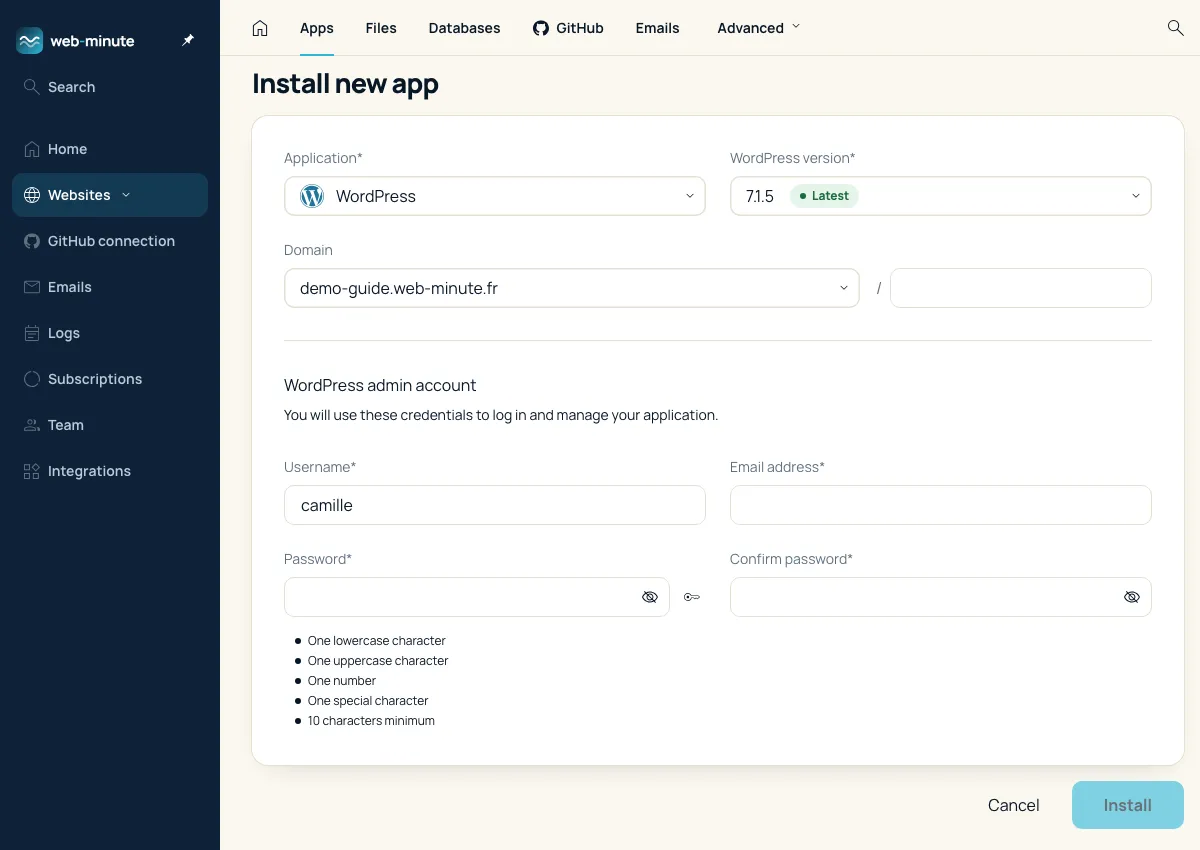
- Domain: the site's address. Leave the box after the "/" empty to install WordPress at the root (your-site.com), or type
blogto install it in your-site.com/blog. - Username, Email address and Password: your login for the WordPress dashboard. Avoid "admin" as the username, it is the first one bots try.
- The password needs at least 10 characters, with a lowercase letter, an uppercase letter, a number and a special character. The small key next to the field suggests one.
3. Install
Click Install. Once the install is done, WordPress shows up in the site's Apps tab, and its dashboard opens at your-site.com/wp-admin with the login chosen in step 2.
Your domain is not connected to our servers yet? The install works anyway, and the site will appear as soon as the domain is connected: see point a domain.
Your WordPress already lives elsewhere
Migration is free: we move the site, its database and its files. To stop worrying about updates, there is WordPress maintenance.